Blog
Build Retail Marketing Workflows in Minutes With AI
September 28, 2026 / 8 minute read / By Zoya Naeem
Artificial Intelligence, Digital Marketing, General

Blog
Marketing automation used to mean spending two hours manually dragging decision trees, setting conditional delays, checking triggers, and hoping you hadn’t accidentally created a workflow that sends the same customer five emails in one day.
The real challenge with marketing automation has never been coming up with ideas. You probably already know the retail marketing workflows you want. Recover abandoned carts. Follow up after a purchase. Bring lapsed customers back. Send different messages based on what someone bought.
The tedious part has been turning those ideas into the actual logic needed to make them work.
That is where AI can make a practical difference.
With Celerant’s AI-Powered Customer Engagement Suite (CES), you can describe the workflow you want in a few sentences. CES takes that instruction and builds the workflow around the customer, order, and purchase data already available in your retail system.
You can then inspect the workflow, adjust the individual actions, and save it for deployment.
Here’s what that looks like:
The easiest way to get started is to forget about the individual boxes and conditions for a moment and focus on what you actually want the customer journey to accomplish. Once you know the outcome, you can tell CES what you want the workflow to do rather than spending your time figuring out how to construct it manually.
From your CES dashboard, head to Automation, select Create Workflow, then choose Build Using AI. You’ll see a prompt box where you can describe the workflow you have in mind, which gives you a much more natural starting point than staring at a blank automation canvas wondering which trigger you need to drag onto it first.
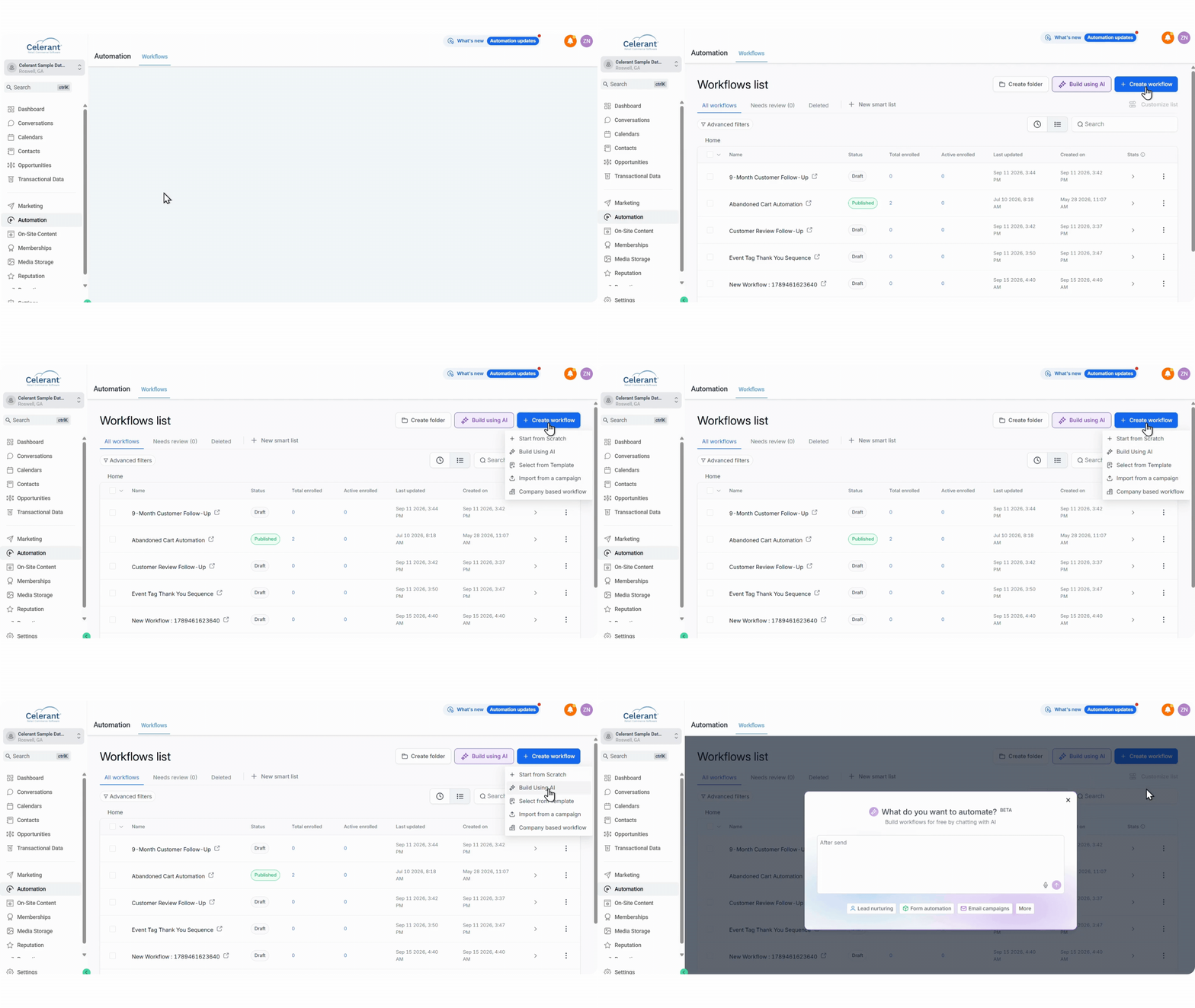
For this example, let’s say you want to recover abandoned carts from customers who added running shoes or other athletic footwear to their cart but left without completing the purchase. You want to give them a reminder after an hour, follow up by SMS the next day, send one final email after another 48 hours, and tag anyone who still hasn’t purchased so you can use that information later.
Manually building every branch and condition behind it can take considerably longer than coming up with the idea itself. With the AI Builder, you can start by explaining the journey you want and let CES handle the first pass at building the logic.
This is where the process gets particularly useful because you don’t need to learn a new syntax or figure out how to phrase your request for the AI Builder. You can simply describe what you want to happen, including who should enter the workflow, what actions should happen along the way, how long CES should wait between them and what should happen if the customer still doesn’t purchase.
For our abandoned cart example, your prompt could look something like this:
Create an abandoned cart workflow for customers who added running shoes or athletic footwear to their cart but did not complete their purchase. Send an email reminder after one hour, followed by an SMS reminder after 24 hours. If they still haven’t purchased, send a final email after 48 hours and apply an “Abandoned Cart – No Purchase” tag.
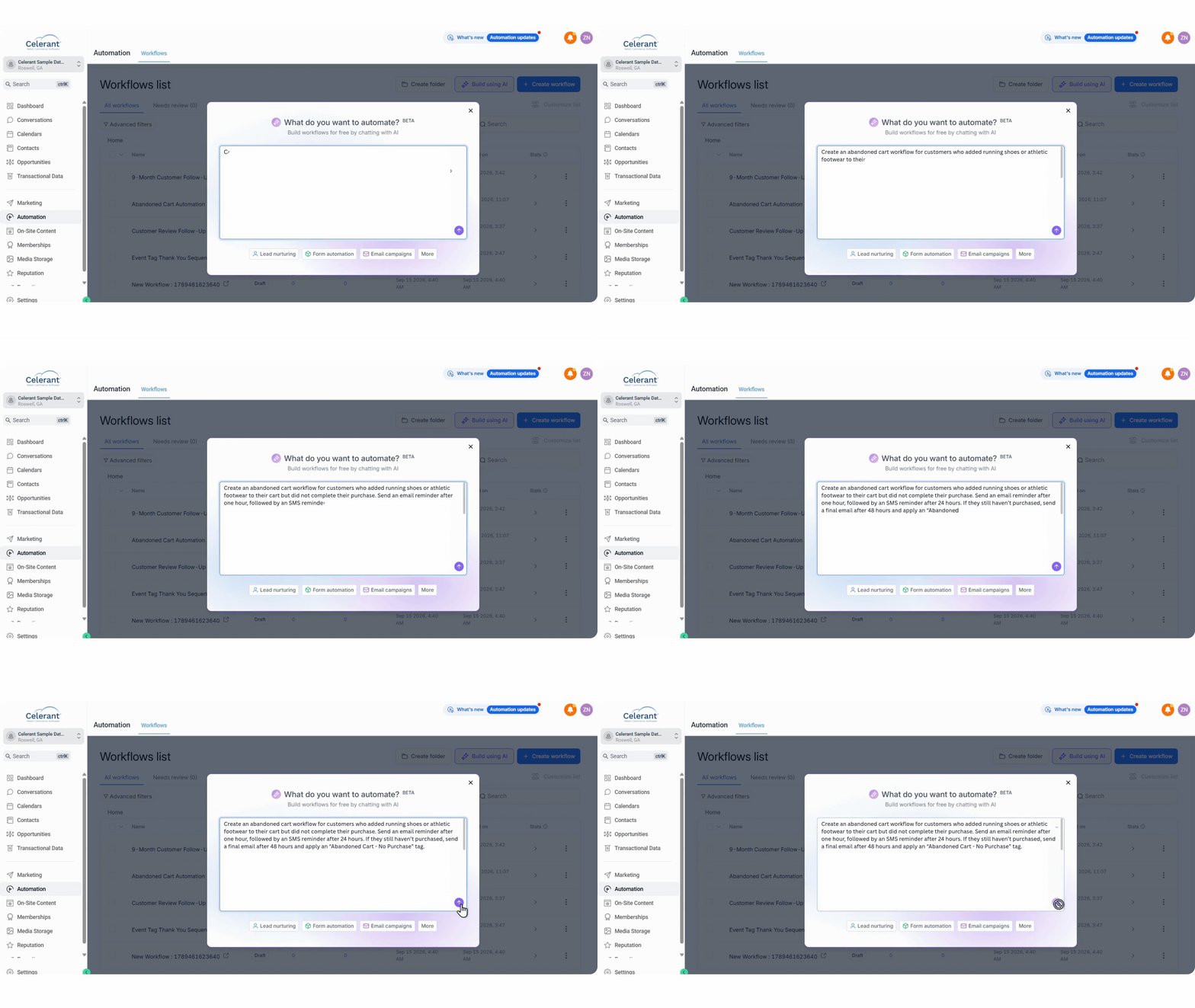
You can make the instructions as detailed as the workflow requires. If there are specific customer segments, timing requirements, conditions or actions you want included, put them into the prompt and give CES the context it needs to build the sequence.
This changes the starting point of workflow creation. You’re describing the business logic in terms you already understand, while CES takes those instructions and translates them into the structure needed to actually run the automation.

Once you submit the prompt, CES starts turning those instructions into the workflow itself. It works through the different actions, conditions, and delays and maps them into a sequence that you can review, giving you a working version of the customer journey without having to manually connect every individual piece.
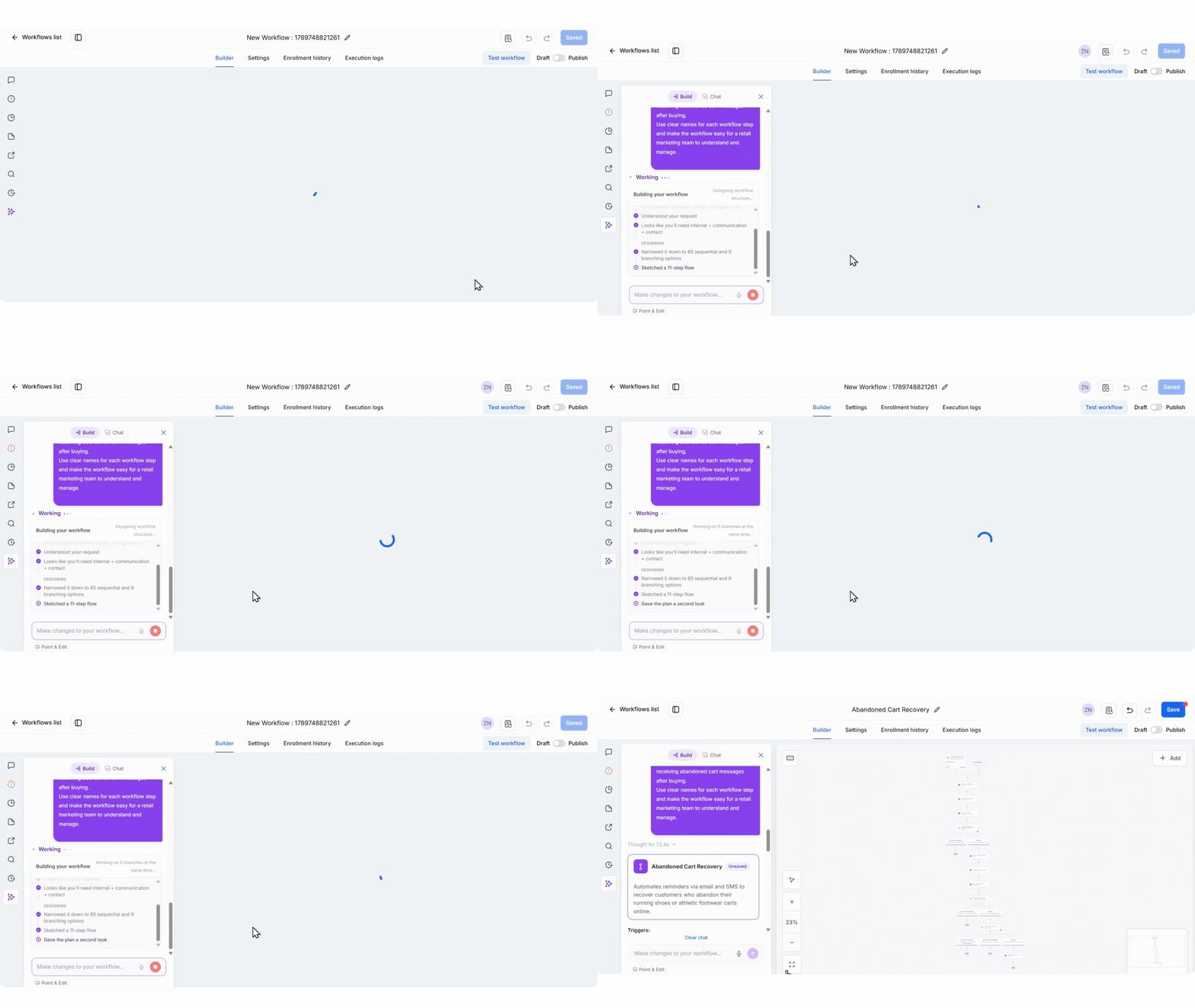
CES takes the requirements from your prompt and builds the corresponding workflow structure. It can work through 85 possible options and reduce them to the sequence you actually need in just a few seconds.
AI helps you focus on what you want the customer journey to accomplish, while CES handles much of the work of turning that thinking into automation logic.
Once CES has finished building the workflow, the entire sequence loads visually on your screen. This is where you can step back from the individual instructions and see how the customer journey actually flows from one action to the next.
You can zoom in, pan around the workflow and check the different branches, giving you a clear view of the delays, email and SMS actions, purchase checks and final tagging action. Because you can see the complete structure, you can also spot anything you want to change before the workflow is put into action.
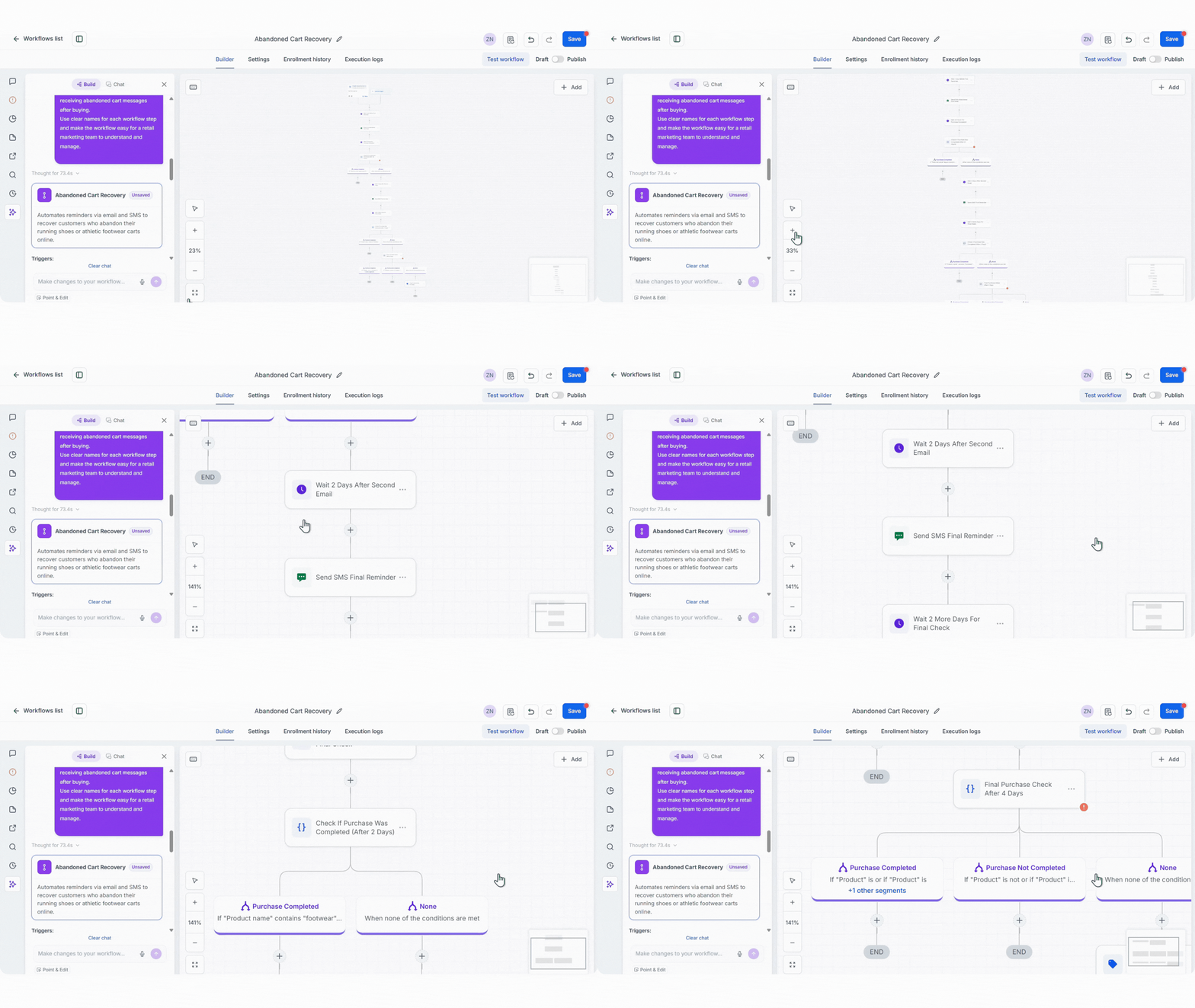
Maybe you want to shorten the delay between the first two messages, add another condition before the final reminder, or change what happens when someone reaches the end of the sequence. You can review the workflow with the same business logic you started with and make those adjustments before saving it.
This review stage is also important because AI should help you build the workflow faster without taking the decision-making away from you. You still get to see exactly what CES has created and decide whether it matches the customer experience you intended.
Once you’ve reviewed the overall flow, you can drill into the individual steps to check the settings behind them. If you want to verify that the final tag is being applied correctly, for example, you can click into that action and confirm that customers who reach the end of the workflow without purchasing receive the “Abandoned Cart – No Purchase” tag.
The same applies to the other actions in the sequence. You can check the timing of your delays, review the email and SMS actions, inspect your conditions and make any changes you need before saving the workflow. That gives you control over the details while still letting AI handle the heavy lifting involved in getting the workflow built in the first place.
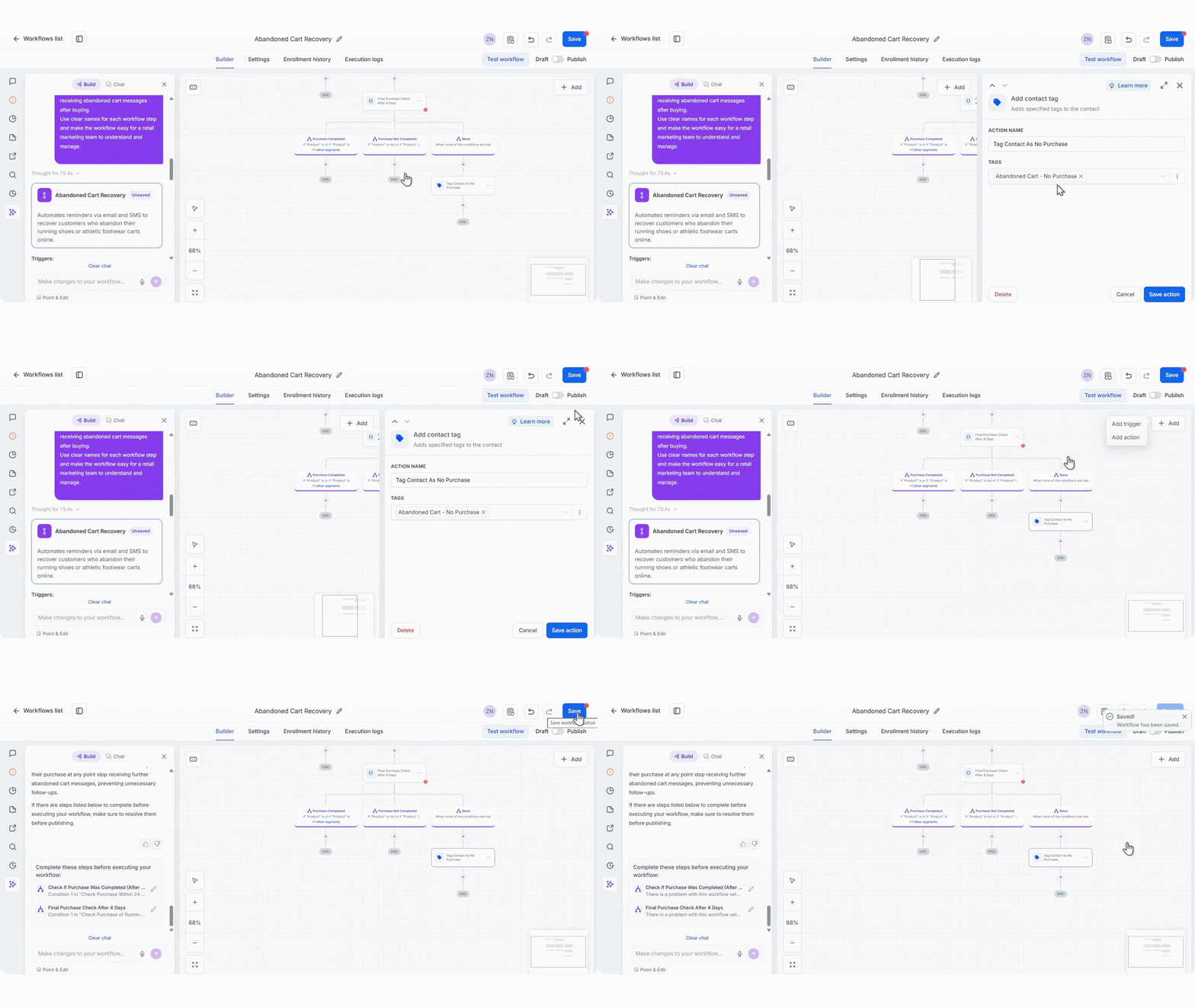
Once you’re happy with how everything looks, save the workflow, and it’s ready for you to deploy when you’re ready.
And because CES is being fueled by Celerant’s ecosystem, so your marketing workflows can work from the same retail data that powers your POS and eCommerce operations rather than relying on manual exports or separate data connections.
The AI-powered workflow is one part of what you can do with CES. If you want to explore the wider set of tools available across email, SMS, automation, and customer engagement, get in touch with your account representative and schedule a time to see it in action.
If you’re currently using Klaviyo or considering it for your retail marketing, we’ve also put together a head-to-head comparison of Celerant’s CES vs Klaviyo that you can read here.
Curious how our retailers are using CES to save time and money?